Data Security for AI | Sensitive Data in Approved AI
Sensitive Data in Approved AI highlights AI applications that are sanctioned or formally approved and the exposure.
This includes Web File Upload activity and Attach to Desktop Applications activity.
The Attach to Desktop Applications exit point enables organizations to detect, monitor, and prevent file attachment attempts to desktop applications such as messaging tools, email clients, and collaboration platforms.
The following widgets are available:
-
Approved AI Overview: Provides and overview of sensitive activity across approved AI apps that may increase data exposure risk
-
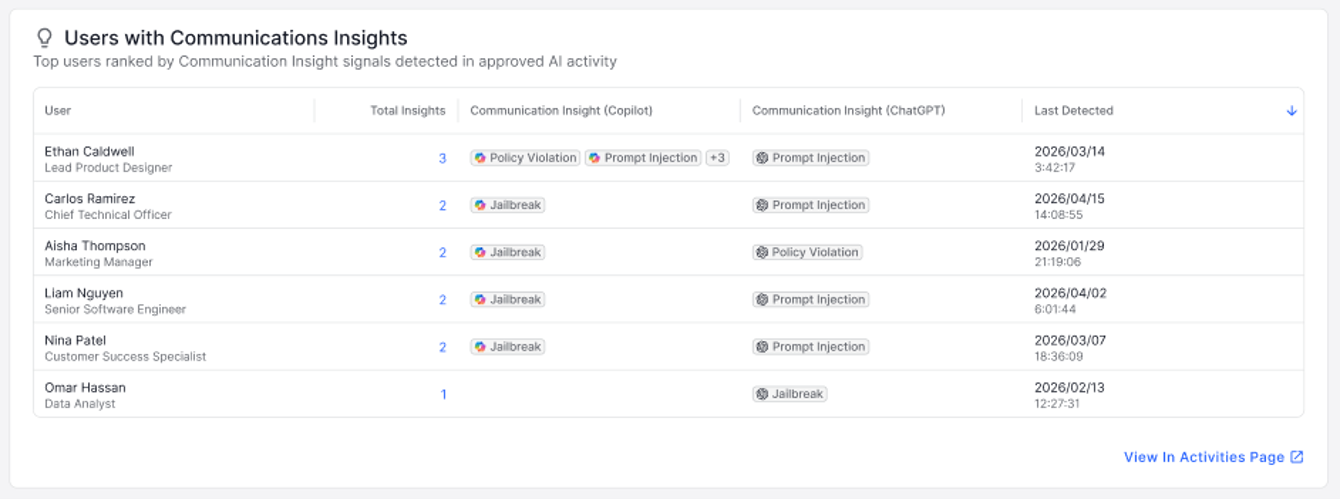
Users with Communications Insights: Let's upi see which apps and users are generating insights without leaving their existing workflow
-
Approved AI Data Exposure: Lets you review the volume of sensitive prompts and file uploads and understand where approved AI apps may introduce risk.
-
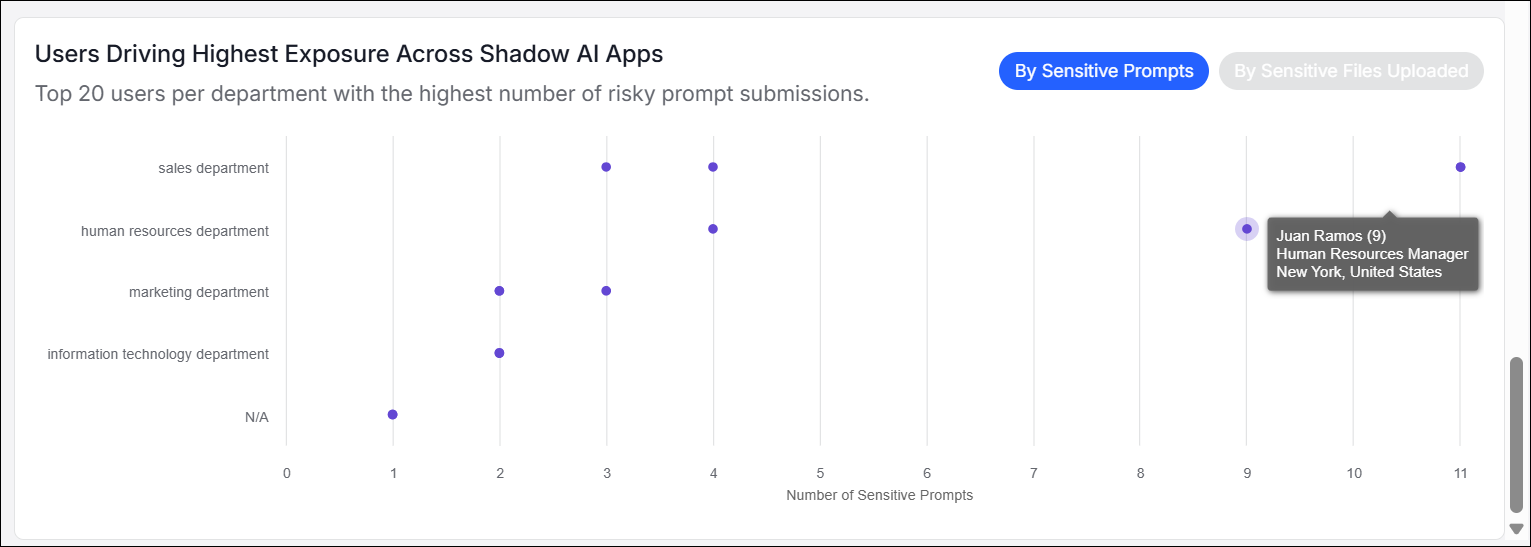
Users Driving Highest Exposure in Approved AI: Identifies the top 20 users per department with the highest number of risky prompt submissions by sensitive prompts and sensitive file uploads.
To access Approved AI Activity, from Data Security for AI app, select Dashboard and select the Approved AI Activity tab.
Approved AI Overview
This widget shows sensitive submissions and identifies where sanctioned AI apps create potential data exposure.
This widget shows the applications used, the number of prompts submitted and files uploaded, and the percentage of activity for each app. In addition, this widget shows the severity and trend data from SIPM, (see SIPM | Approved Applications).
Communication Insights are also displayed here. Data Security for AI surfaces Nuclei Communication Insights (Communication Insights), helping you spot risky AI usage patterns - including prompt injection, jailbreak attempts, and policy violations - across Copilot, ChatGPT, and Claude.
For more information about Nuclei Communication Insights, see https://www.nuclei.ai/

Clicking on the number of applications, for example 220 Claude prompts, opens the Data Security for AI | Activities dashboard. (See Data Security for AI | Activities.)
Users with Communications Insights
The Communication Insights summary appears on the Approved AI Activity tab by application, with matching detail surfaced in the user details drawer, so you can see which apps and users are generating insights without leaving their existing workflow. Every summary element links through to the underlying activity in the workbench with filters preserved, so analysts can move from a high-level signal to the specific conversation in one click.
This view lets you know where the insight occurred and when it was last detected.
Approved AI Data Exposure
Approved AI Data Exposure lets you review the volume of sensitive prompts and file uploads and understand where approved AI apps may introduce risk.
You can use this widget to help you answer questions such as:
-
How much sensitive data is being shared with approved AI applications?
-
Which data classifications appear most frequently in AI prompts or uploads?
-
How many files have been uploaded via Desktop Applications.
-
Where might additional controls or policy refinements be needed?
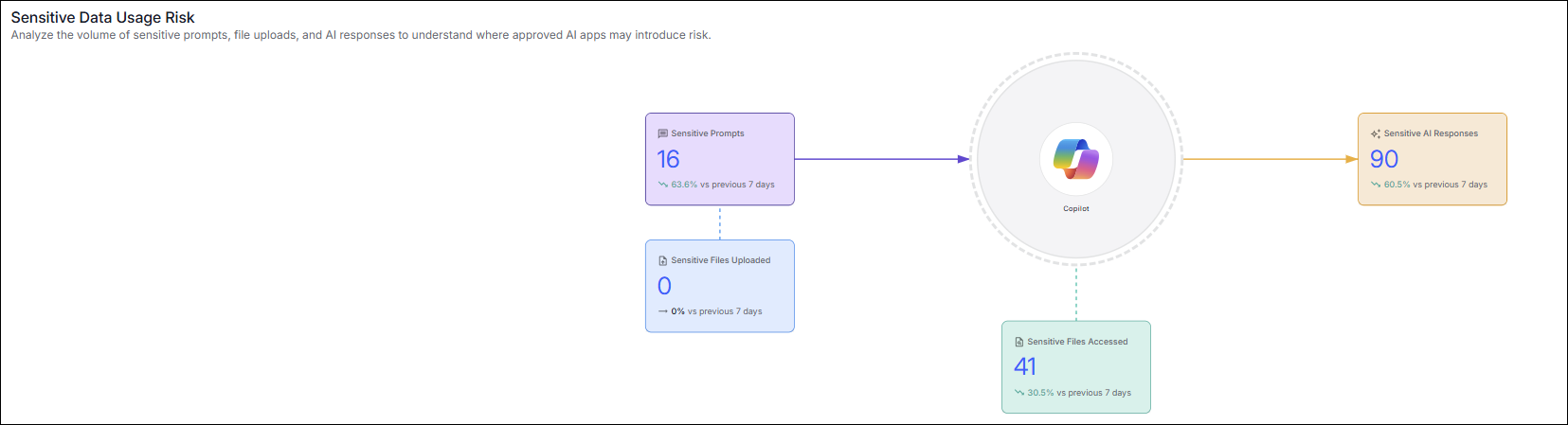
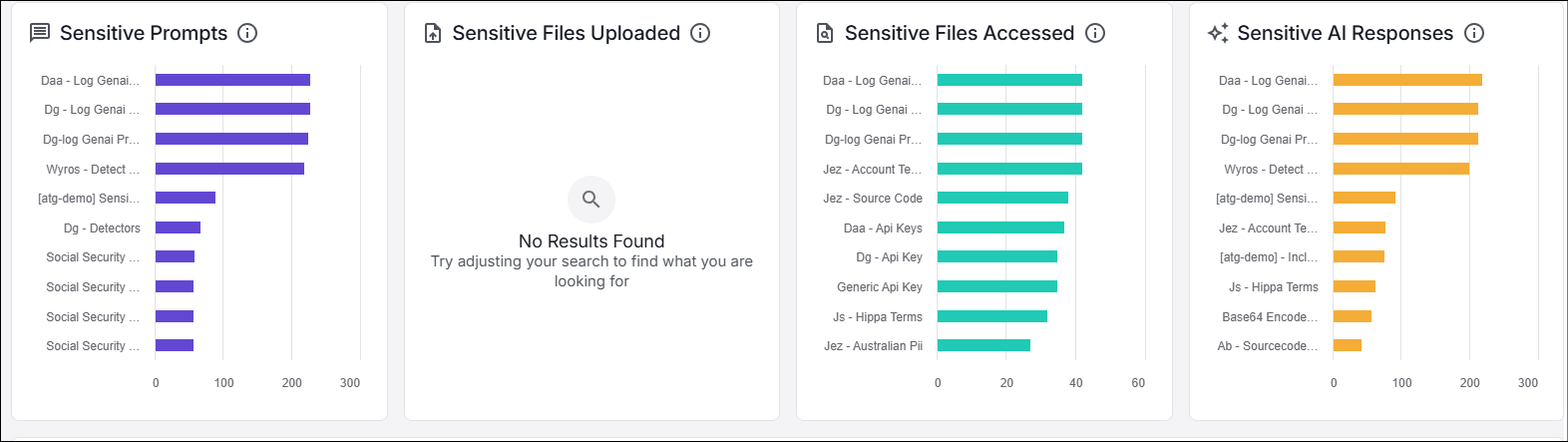
Sensitive Prompts, Sensitive File Uploads, Sensitive Files Accessed and Sensitive AI Responses graphs show details about the activity. This information is based on the defined detectors. You can see which activities are performed the most often by Data Classification. For example, Social Security information that the user submitted at the prompt.
These widgets show sensitive files uploaded and sensitive files uploaded via Attach to Desktop Applications activity.
Users Driving Highest Exposure in Approved AI
(By Sensitive Prompts / By Sensitive File Uploads)
Users Driving Highest Exposure in Approved AI widget identifies the top 20 users per department with the highest number of risky prompt submissions by sensitive prompts and sensitive file uploads. Hovering over one of the dots shows you who the user is and the number of activities.
You can use this widget to help you answer questions such as:
-
Which users are responsible for the highest sensitive data exposure via unapproved AI?
-
Which departments have the most users interacting with unapproved AI tools?
-
Are specific users repeatedly submitting sensitive prompts or files?
-
Which users require follow-up training, investigation, or remediation?
Related Topics:
Data Security for AI | Dashboard
Data Security for AI | Approved AI Posture