To view the new Data Store pages, click your profile icon. In the New UI section, turn on the Data Stores toggle.
The Connect tab is only available for structured data stores (e.g., relational databases like PostgreSQL). This tab is not available for SaaS data stores.
Use the Connect tab to configure and manage data store connection details. This information is used by DSPM to access the data store and scan the data. Managing connection details manually is crucial for data stores that do not rely on automatic discovery or that require specific credentials or connection methods.
The Connect tab is essential for establishing secure and functional connections to your data stores, enabling DSPM to:
- Initiate Scans: Once connected, DSPM can proceed with scanning the data store for classification, risks, and access details.
- Maintain Data Visibility: Ensure continuous monitoring and protection of sensitive data within the connected data store.
- Update Credentials: Easily update connection details if credentials change or there’s a need to switch connection methods.
To view the Connect tab:
- Select Inventory > Data Stores.
- Select the Data Stores tab.
- Select a data store. The Overview tab opens.
- Select the Connect tab.
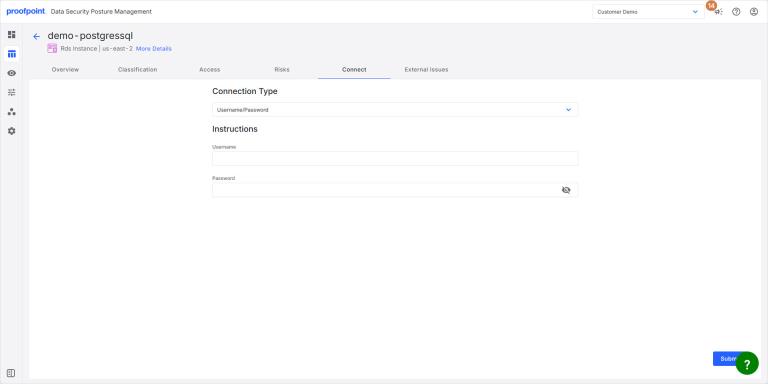
Connection Type
- Select the method for providing the data store connection credentials and enter the required information. For details, see:
- When you’re done, click Submit to save the connection details.
Username/Password
Allows direct input of a username and password for authentication.
This method is not recommended for production systems.
Standalone Scanner
Applies to connections managed by a separate scanner instance. Follow the instructions on the screen to add the DSPM data scanner to your environment. For details, see Standalone Scanner.
Secret Manager
Integrates with AWS Secrets Manager to retrieve sensitive credentials securely. For details, see AWS Data Store Scanning Using Secrets Manager.
IAM Role
Utilizes an AWS Identity and Access Management (IAM) role for authentication.
Azure AD Username/Password
Uses Azure Active Directory credentials for authentication.
Azure Connection String
Provides a connection string for Azure-based data sources.
IAM DB User
Connects using an IAM database user. For details, see AWS Data Store Scanning Using IAM DB User.
Azure User Managed Identity
Leverages an Azure User Managed Identity for authentication. For details, see Azure User-Assigned Managed Identity.