You can use an Azure user-assigned managed identity to connect an Azure Cosmos DB to DSPM.
In Azure Portal:
- Create an Azure user-assigned managed identity. Alternatively, you can use an existing user-assigned managed identity.
- Assign the user-assigned managed identity to the data store.
- Create a private endpoint. This endpoint will be used to allow access to the data store from a virtual network (VNet).
- Create a custom VNet. For instructions, see Azure Deployment Using Existing Networking Resources.
- Connect the private endpoint to the custom VNet.
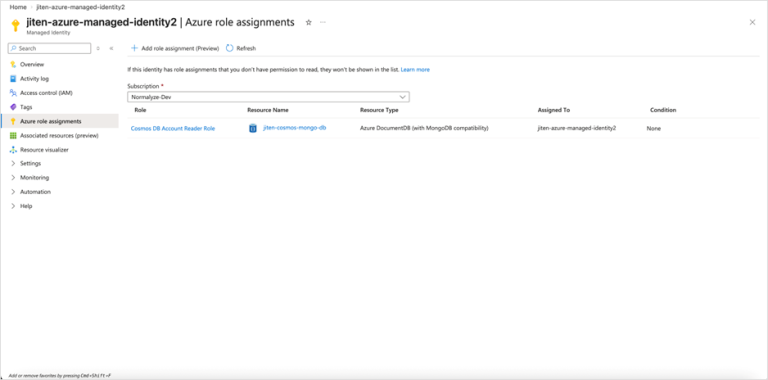
- Grant the user-assigned managed identity the Cosmos DB Account Reader Role on the data store. For example:
In DSPM:
- Select Inventory > Data Stores.
- Select the Data Stores tab.
- Select a data store.
- Select the Connect tab.
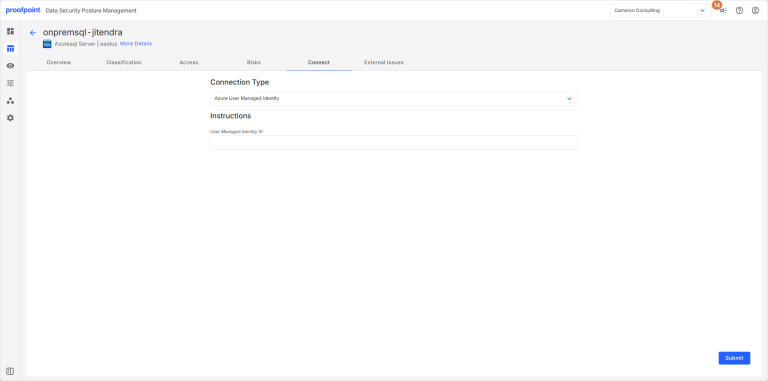
- Enter the following information:
- Connection Type: Select Azure User Managed Identity.
- User Managed Identity ID: Enter the object ID of the user-assigned managed identity.
Example:
/subscriptions/8a432cb8-7b8d-49ad-8bbe-747f943a9262/resourceGroups/abc-azure-resource-group/providers/Microsoft.ManagedIdentity/userAssignedIdentities/abc-user-managed-id
- Click Submit.