This feature is only available for AWS RDS instances.
You can use AWS Secrets Manager to connect data stores (such as RDS, Elasticache, Athena, and Redshift) to DSPM. This allows DSPM to connect securely to a data store using the AWS secret ARN. DSPM leverages the AWS Secrets Manager to connect to data stores while running a Data Scan.
Set Up a Secret Manager Connection
Setting up a Secret Manager connection includes providing the secret ARN value to use for the connection.
The secret associated with the RDS must have Read privileges on all the schemas and tables in the database.
To set up a Secret Manager connection for a data store:
- Select Inventory > Data Stores.
- Select the Data Stores tab.
- Select a data store with an associated secret ARN.
- Select the Connect tab.
- Enter the following information:
- Connection Type Select Secret Manager.
- Secret ARN Enter the secret ARN. This is the Amazon Resource Name (ARN) of the secret stored in AWS Secrets Manager. This ARN points to the location where the database credentials (username, password, etc.) are securely stored.
- Click Submit.
The DSPM Data Scan is now able to connect to the database, read the table data, and detect sensitive information.
Determining the Secret ARN for a Data Store
You can use the Query Builder to determine which AWS secret is linked to a specific data store.
- Select Investigate > Query Builder.
- Enter the following criteria:
- Set the first criteria to AWSAccount and set the id parameter to the AWS Account Id value.
- Select the relationship RESOURCE.
- Set the next criteria to AWS Secret.
- Select the relationship SECRET_OF.
- Set the next criteria to RDSInstance.
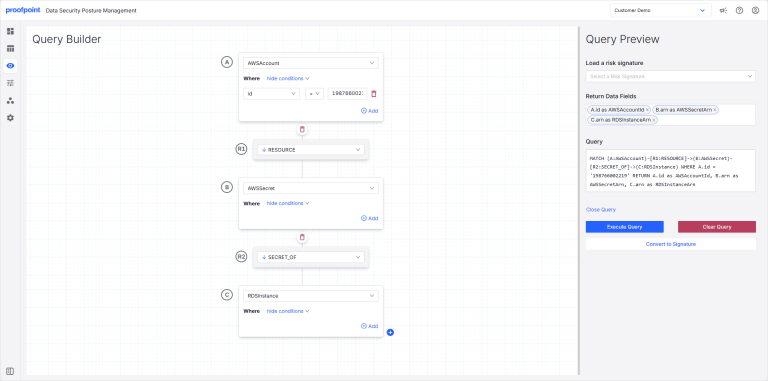
- Click Execute Query. The secret ARNs attached to the RDS instances on AWS are shown.
