This topic describes what you can do when Apple pop-ups display after macOS Agent installation.
Permissions Pop-ups
The system may show a brief informational pop-up.
The periodic automatic pop-up is just a visual notification. It does not require any action and disappears automatically. It visible for a few seconds, and then disappears automatically.
From macOS Agent 4.4.2 and earlier
Suppressing the Pop-ups
This is not a Proofpoint Agent issue and can be resolved by doing the following:
-
Deploy the latest Configuration Profile included within management tools package. (See Management Tools.) (Endpoints > Downloads > Management Tools section in the Admin app.)
-
Always use a Signed profile. You can do this with either available Configuration Profile:
-
For macOS Agent version 4.4.3 and later:
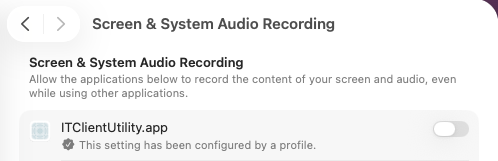
IT Viewer macOS 11.signed.mobileconfig Configuration Profile signed by Proofpoint. Turn on the ITClientUtility.app
.
-
For macOS Agent version 4.4.2 and earlier:
-
IT Viewer macOS 11.signed.mobileconfig: Configuration Profile signed by Proofpoint. The default process name logger is used with this option.
-
IT Viewer macOS 11.mobileconfig: The unsigned Configuration Profile, which must be signed by the customer. Choose this option if you want to change the process name from logger to a name of your choice.
-
For information about signed and unsigned profiles, see this article.
-
Find Devices on Local Network Pop-up
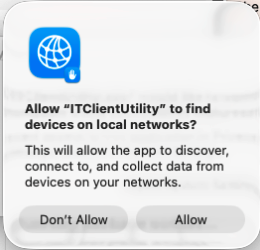
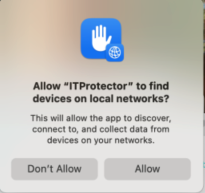
This topic describes the Allow “ITProtector” to find devices on local networks? or Allow “ITClientUtility” to find devices on local networks?pop-up may be displayed by the operating system after installation.
If this pop-up displays, select Allow. The Proofpoint Agent generates a script and the pop-up closes.
-
From macOS Agent 4.4.3 and later, the pop-up may display for IT Client Utility.
-
For all macOS Agents, the pop-up for ITProtector may displays.
Related Topic:
Mac Agent and Apple Privacy Controls
Screen Recording Policy - Mac Agent and Apple Privacy Controls
Configuration Profiles - Mac Agent and Apple Privacy Controls