Proofpoint ZenWeb is an optional module that does not require an additional license. It is built as a Chromium-based browser extension that utilizes the Chrome API.
The ZenWeb browser extension enhances the existing endpoint data leak prevention capabilities of the Proofpoint Agent. As an add-on to the agent, it improves the user experience and increases the accuracy of web upload blocking. The extension supports the agent by performing rule assessment and content scanning, and sending the resulting data to the customer's tenant.
Without ZenWeb, the Proofpoint Agent first attempts to extract the URL of web activity using Web Accessibility. If Web Accessibility is unavailable, the agent extracts the URL directly from the browser's address bar instead. This method is less accurate and may capture a partial URL if it is still being typed, rather than the actual URL that was opened — which can also introduce latency in the browser experience.
When ZenWeb is enabled for a supported activity, and the extension is active and communicating with the agent, the agent queries the extension for browser activity context instead of relying on Web Accessibility. If the agent is unable to communicate with the extension, it falls back to Web Accessibility or other agent-side collection methods.
Installation
After the initial download, the Proofpoint ZenWeb is automatically updated to the latest version.
You can install the Proofpoint ZenWeb on a single endpoint or deploy on multiple endpoints (GPO).
For instructions to install Proofpoint ZenWeb on a single endpoint and on multiple endpoints, see Proofpoint ZenWeb Deployment and Installation.
Incognito Mode
Proofpoint ZenWeb cannot work in Incognito mode without explicit permission by the user. To ensure that Incognito browsing does not become an unmonitored exit point for Proofpoint's ITM/DLP agent, do the following:
-
Force users to allow ZenWeb on Microsoft Edge’s InPrivate browsing by using MandatoryExtensionsForInPrivateNavigation MDM managed key (https://learn.microsoft.com/en-us/deployedge/microsoft-edge-browser-policies/mandatoryextensionsforinprivatenavigation).
-
Block users from using Incognito mode, on non-Microsoft Edge browsers, based on policy set by organization’s IT.
Enabling Proofpoint ZenWeb and Activities
To use the Proofpoint ZenWeb Browser Extension, you must first enable it at the Agent Realm level, then enable the specific activities you want it to handle.
Enable the Browser Extension
From the Administration application, select Endpoints > Agent Realms. In the Advanced Settings of the Agent Realm, in the Browser Extension area, turn on Enable Browser Extension.
Enable Activities
Enable the specific activities you want the Browser Extension to use. If an activity is not enabled, the agent will not use the Browser Extension for it.
How activity enablement works
Enabling an activity for the Browser Extension does not disable the agent's existing support for that activity — it only adds ZenWeb as a collection method. The agent continues to support the activity through its standard collection methods (such as Web Accessibility) whenever ZenWeb is unavailable or doesn't apply.
ZenWeb is used for an activity only when that activity is both:
-
Enabled for the Browser Extension, and
-
Supported for the installed agent version, browser, and platform combination
If an activity isn't supported under the current configuration, the agent falls back to its existing collection methods automatically — no additional configuration is needed. Enabling an activity for the Browser Extension does not mean the agent stops supporting that activity entirely. The agent continues to support the activity through its standard collection methods (such as Web Accessibility) when ZenWeb is unavailable or does not apply.
ZenWeb is used only for activities that are both enabled and supported for the installed agent version, browser, and platform. If an activity is not supported under the current configuration, the agent relies on its existing collection methods instead.
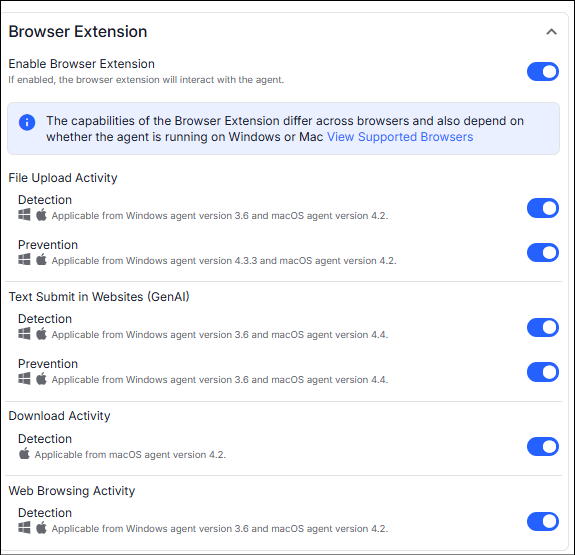
Proofpoint ZenWeb Supported Activities
Most of the activities are supported for Agent or Agent and ZenWeb. Deploying the Agent with ZenWeb enhances the capabilities.
You must toggle on the relevant activity in the Agent Realm
Detect/Prevent Text Submit in Websites (GenAI) is supported only with the Agent and ZenWeb. All other activities are supported for Agent only or Agent and ZenWeb.
Windows Agent
| Activity | Supported Agent and ZenWeb deployments | ZenWeb Supported Browsers | Agent Minimum versions for ZenWeb Compatibility |
|---|---|---|---|
| Detect File Upload Activity |
Agent only or Agent + ZenWeb |
Google Chrome Microsoft Edge Island Enterprise Opera |
3.6.0 |
| Prevent File Upload Activity |
Agent only or Agent + ZenWeb |
Google Chrome Microsoft Edge Island Enterprise Opera |
4.3.3 |
| Detect Web Browsing Activity |
Agent only or Agent + ZenWeb |
Google Chrome Microsoft Edge Island Enterprise Opera |
3.6 |
|
Detect/Prevent Text Submit in Websites (GenAI) |
Agent + ZenWeb |
Google Chrome Microsoft Edge Island Enterprise Opera |
3.6 |
| Differentiate Between Corporate and Personal GenAI Activities |
Agent only or Agent + ZenWeb |
Google Chrome Microsoft Edge Island Enterprise Opera |
5.0 |
Mac Agent
| Activity | Supported Agent and ZenWeb deployments | ZenWeb Supported Browsers | Agent Minimum versions for ZenWeb Compatibility |
|---|---|---|---|
| Detect File Upload Activity |
Agent only or Agent + ZenWeb |
Google Chrome Microsoft Edge Firefox |
4.2 |
| Detect Web Browsing Activity |
Agent only or Agent + ZenWeb |
Google Chrome Microsoft Edge Firefox |
4.2 |
|
Detect/Prevent Text Submit in Websites (GenAI) |
Agent + ZenWeb
|
Google Chrome Microsoft Edge Firefox |
4.4 |
| Detect Download Activity |
Agent only or Agent + ZenWeb |
Google Chrome Microsoft Edge Firefox |
4.2 |
| Differentiate Between Corporate and Personal GenAI Activities |
Agent only or Agent + ZenWeb |
Google Chrome Microsoft Edge Firefox |
5.0 |
| Prevent File Upload Activity |
Agent only or Agent + ZenWeb |
Google Chrome Microsoft Edge Firefox |
4.2 |
File Upload is limited to 1000 files.
Supported GenAI Sites
-
ChatGPT by OpenAI: ChatGPT
-
Gemini by Google: Google Gemini
-
Copilot by Microsoft:
-
Claude (by Antrophic): Claude
-
Deep Seek Chat: chat.deepseek.com/sign_in
-
Perplexity: https://www.perplexity.ai/
-
character.ai: https://character.ai/
-
AnonChatGPT: https://anonchatgpt.com/
-
YouChat: https://you.com/
-
Grok: https://grok.com/
-
Mistral AI: https://chat.mistral.ai/chat
-
Liner: https://app.liner.com/
-
Quillbot:
Paraphrasing Tool (Ad-Free and No Sign-up Required) - QuillBot AI
-
Genspark: Genspark - The All-in-One AI Workspace