The All Open Risks tab shows all of the risks found in your cloud. This tab contains detailed views of the discovered risks along with their associated resources, entities, and assets.
Each risk is linked to the resource in which it was detected. Detailed information is shown for each risk, such as the resource name, cloud account name, when the risk was first seen and last seen, the risk impact, and risk severity.
To view the policy for the risk (previously called risk signature), click in the Action column, then select View Risk Signature.
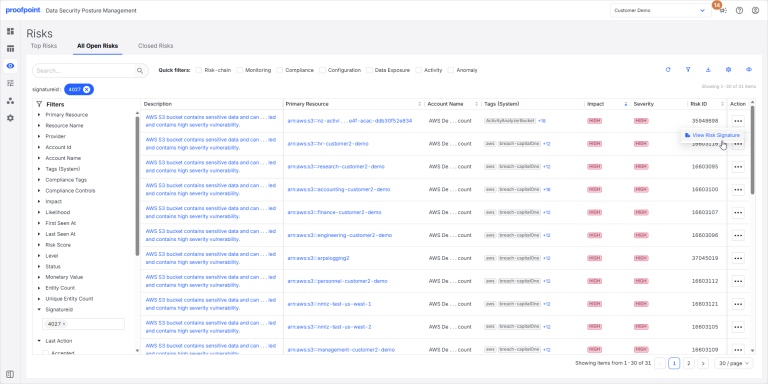
Information shown for each risk includes:
|
Field |
Description |
|---|---|
|
Description |
Description of the risk. |
|
Risk ID |
Unique ID for the risk. |
|
Primary Resource |
Resource ID of the object for which the risk has been detected. |
|
Resource Name |
Resource name as defined in the Cloud account. |
|
Provider |
Cloud provider for the resource. |
|
Account ID |
ID of the Cloud account to which the resource belongs. |
|
Account Name |
Name of the Cloud account in which the data store is created. |
|
Tags (System) |
Tags that can be used to filter the risks on this page. These tags are defined by DSPM and include all tags that apply to the risk (compliance tags, risk tags, data store tags, etc.). |
|
Tags (Custom) |
Tags that can be used to filter the risks on this page. These are custom tags defined by your organization and include all tags that apply to the risk (compliance tags, risk tags, data store tags, etc.). |
|
Compliance Tags |
Compliance tags that apply to the risk. |
|
Compliance Controls |
Compliance controls that apply to the risk. |
|
Impact |
Severity of the security breach for the identified risk (Low, Medium, High). |
|
Likelihood |
Possibility that the risk could lead to a security breach (Low, Medium, High). |
|
First Seen At |
Time when the resource was first discovered and listed in DSPM. |
|
Last Seen At |
Last time the resource was accessed. |
|
Risk Score |
Aggregated risk score based on the risk’s impact and likelihood scores. |
|
Status |
Data store status (Open, Closed). |
|
Monetary Value |
Financial impact that would result if a data breach occurred for the resource. |
|
Signature ID |
Unique ID of the policy (previously called risk signature) for the risk. |
|
Last Action |
Last action recorded for the risk (Discovered, Assigned, Ignored, Accepted). |
|
Resource Types |
Type of resource (IAM, S3Bucket, GCPBucket, etc.). |
|
Resource Owners |
ID of the entity that owns the resource. For example, an user ARN for AWS, or a user ID for Azure. |
|
Data Classification |
Data classification assigned to the risk, based on your entities and profiles. |
|
Region |
Region where the data store is located. |
|
Action |
Show or hide the Action column. |
Risk Details
Click a risk description to view the risk details, severity, and the steps that should be taken to remediate the risk.
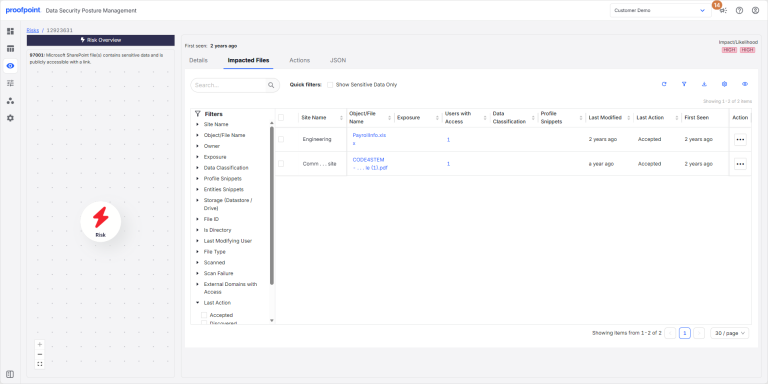
Details
Shows details for the risk such as the risk description, impact and likelihood, remediation steps to deal with the risk, the query used by DSPM to search for the resource, compliance tags, and compliance controls.
Impacted Files
Shows details for the files affected by the risk. Use the Action column to ignore the risk for a specific file.
- (Optional) To make changes for multiple risks at once, select the checkbox beside the risks you want to change.
-
In the Action column for the risk you want to change (or for one of the risks you selected in step 1):
- Select Accept Risk to ignore the risk. The Last Action for the file is changed from Discovered to Accepted.
- Select Unaccept Risk if you no longer want to ignore the risk. The Last Action for the file is changed from Accepted to Discovered.
Actions
Shows the actions taken for the risk. Actions can be performed manually or by an automation. For manual actions, the User column shows the name of the user that created the action. For automation actions, the User column shows the name of the automation task.
JSON
Shows the JSON data of the risk. Includes details for the resource and tags shown on the Details tab.