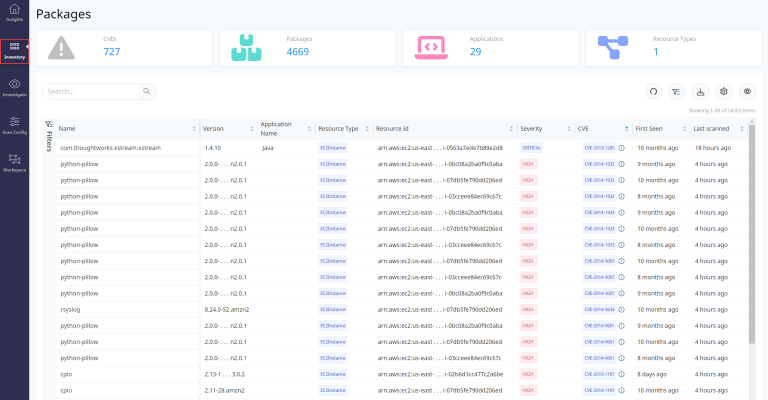
The optional Packages section lists all the libraries and packages that are installed on compute instances like AWS EC2, ECR, Azure Virtual Machines either by the host OS or as a result of a software requirement.
This feature is not enabled by default. If you wish to have this enabled, please speak with your account representative.
DSPM scans all the libraries and packages attached to the compute instances and links vulnerability information (CVE / GHSA) if it is found for any of them.
The linked CVE / GHSA has additional information provided like the Description, Severity, and References for the mentioned vulnerability, plus Vendor Severity and the CVSS score details.
All the information related to the packages and the associated vulnerabilities are discovered by the Vulnerability Scan task (see Package Risks).
Details which are provided about the packages discovered are as follows:
|
Field |
Description |
|---|---|
|
Name |
The package name which is discovered is listed under this column |
|
Version |
This column lists the version of the library or the package |
|
Application Name |
The parent software / application which is installed on the instance and under which the package is part of. |
|
Resource Type |
Instance on which these packages are installed. For eg: EC2Instance, AzureVM, ECRepository. |
|
Resource ID |
The full ARN or ID of the EC2 or AzureVM instance respectively. |
|
Resource Name |
The instanceID of the EC2 instance or the VM name for Azure VM as discovered from the respective cloud accounts. |
|
Provider |
Cloud Provider |
|
Account ID |
The value for the account which is onboarded and the asset store is part of. |
|
Region |
Region where the data store is located |
|
Severity |
This column shows the level (severity) as mentioned on the NVD database. |
|
CVE |
This section shows the actual vulnerability tracking ID - CVE. This information is collected from the NVD database. Besides the CVE number there is an information (i) icon which can be selected to show further details about the CVE. |
|
First Seen |
This column shows the timeline when the package was first detected by the Vulnerability scanner. |
|
Risk |
Risk Score |
|
Environment Type |
|
|
OS |
This section shows the operating system make and version of the instance where the package resides. |
|
NVD Component |
This column shows the information for the parent package / library under which the specific package resides and against which the NVD database has attached the CVE finding. |
|
Host Name |
This column displays the hostname of the instance where the package is installed. The column would be blank for those packages which are discovered for ECRepository Resource Types. |
|
Last Scanned |
This column shows the last time when the Vulnerability Scanner successfully scanned the package. |
Apart from the aforementioned details that are listed for all the packages on this section, there are four widgets which give aggregate information for specific entities. The details for these widgets are explained in the following sections.