To view the new Data Store pages, click your profile icon. In the New UI section, turn on the Data Stores toggle.
The Sites tab lists the SharePoint sites and subsites within a data store.
To view the Sites tab:
- Select Inventory > Data Stores.
- Select the Data Stores tab.
- Select a data store. The Overview tab opens.
- Select the Sites tab.
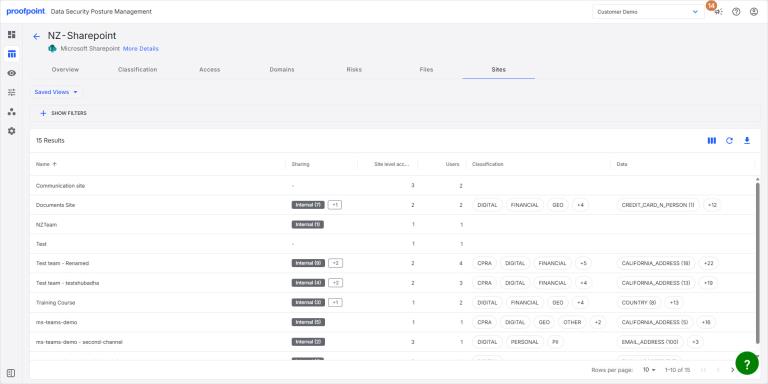
The tab lists the information for each SharePoint site, including:
- Name SharePoint site name.
- Sharing Sharing status of the site.
- Site level access Number of users and groups with access to the site. Click the number in this column to view details.
- Users Number of users for the site.
- Classification Classification tags for the site.
- Data Data tags (entities and profiles) for the site.
- Site Type (Root/Subsite) Indicates whether the site is the root (top-level) site or a subsite.
- Root Site If the site is a subsite, shows the top-level site.
- Site Path Shows the full path (example: /Finance/AP/InvoicesFY25).
View Data Snippets
Click the Data or Classification name. The Data Snippets panel opens with additional information about the item. For more information, see Data Snippets.