To view the new Data Store pages, click your profile icon. In the New UI section, turn on the Data Stores toggle.
The Classification tab provides a detailed breakdown of all sensitive data classifications discovered within the data store.
This tab is essential for understanding the sensitive data landscape within a specific data store and identifying key areas for data security focus.
Use this tab to review the types of sensitive data in the data store, their classification categories, and the count of files or data elements where they were identified.
To view the Classification tab:
- Select Inventory > Data Stores.
- Select the Data Stores tab.
- Select a data store. The Overview tab opens.
- Select the Classification tab.
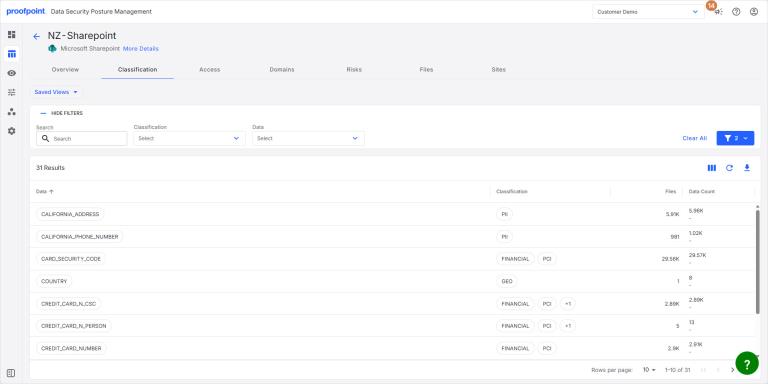
The Classification tab lists key information for each detected data classification:
- Data Name of the sensitive data type (entity or profile) identified (e.g., DOMAIN_NAME, EMAIL_ADDRESS, PERSON).
- Classification Broader category or policy to which the data type belongs (e.g., DIGITAL, PII, PERSONAL).
- Files Number of files where the classification was found.
- Data Count Number of data elements where the classification was found.
- Unique Count Number of unique instances of the data type.
View Data Snippets
Click the Data or Classification name. The Data Snippets panel opens with additional information about the item. For more information, see Data Snippets.