DSPM can leverage existing networking resources in Azure subscriptions for the purposes of scanning data stores, rather than creating new and dedicated ones through scan automation. In order to leverage existing networking resources, they must be tagged with specific key/value pairs and in some cases given specific names. For details on how to tag Azure resources, see the Microsoft documentation.
Below are the resources that must be tagged or created to support this.
Minimum Onboarding Version 28 for Azure required.
Azure Onboarding v28 Overview
Grants permissions to integrate custom VNet with DSPM compute resources
Description
- When a customer chooses to use their own VNet, DSPM needs to integrate the custom VNet with DSPM compute resources.
Permissions Added
- Microsoft.Network/virtualNetworks/subnets/join/action
- Microsoft.Network/privateEndpoints/privateDnsZoneGroups/write
- Microsoft.Network/privateDnsZones/join/action
Resource Group and VNet
Tag both the Resource Group and VNet that you want DSPM to leverage with the following tag.
The tag Name is:
Name: used_byThe tag value is the DSPM onboarding ID.
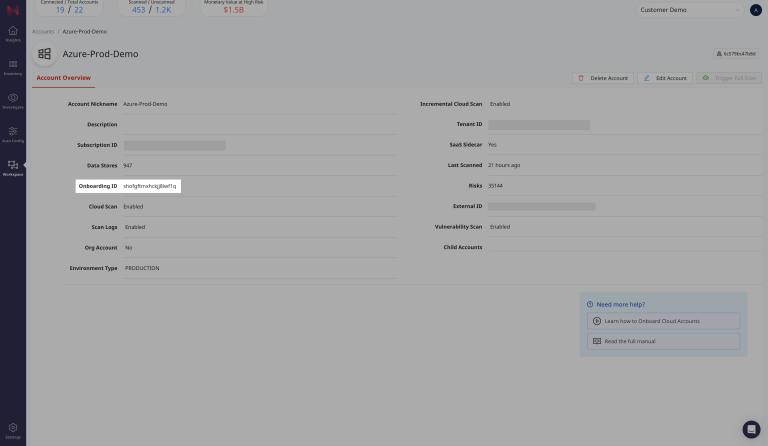
Value: normalyze-<onboardingId>The onboarding ID can be found in the DSPMAccounts page by clicking into the subscription in question.
Subnet
DSPM Function App Scanner Subnet
Create a subnet for the DSPM Function App within your Resource Group and VNet by running the following command. Be sure to replace the Resource Group and VNet values with your Resource Group’s and VNet’s actual names.
- The name MUST equal
normalyze-functionapp - This subnet must be delegated to
Microsoft.Web/serverFarms - This subnet must be assigned the
Microsoft.Storage.Globalservice endpoint
Example CLI Deployment command:
az network vnet subnet create --resource-group "<your_resource_group_name_>" --name "normalyze-functionapp" --vnet-name "<your_vnet_name>" --address-prefixes "10.0.1.0/24" --delegations Microsoft.Web/serverFarms --service-endpoints "Microsoft.Storage.Global"DSPM VM Scanner Subnet
Create a subnet for the DSPM VM Scanner within your Resource Group and VNet by running the following command. Be sure to replace the Resource Group and VNet values with your Resource Group’s and VNet’s actual names.
- The name MUST equal
normalyze-vm - This subnet should not be delegated to any service
- This subnet must be assigned the
Microsoft.Storage.Globalservice endpoint
Example CLI Deployment command:
az network vnet subnet create --resource-group "<your_resource_group_name>" --name "normalyze-vm" --vnet-name "<your_vnet_name>" --address-prefixes "10.0.2.0/24" --service-endpoints "Microsoft.Storage.Global" Private DNS Zone
Create a private DNS zone for your Resource Group with the following name if one does not already exist. Be sure to replace the Resource Group with your Resource Group’s actual names.
az network private-dns zone create --resource-group "<your_resource_group_name>" --name "privatelink.blob.core.windows.net"Virtual Network Link
Create a virtual network link to the tagged Resource Group/ Net if one does not already exist. Be sure to replace the Resource Group and VNet values with your Resource Group’s and VNet’s actual names.
Auto registration must be enabled.
az network private-dns link vnet create --resource-group "<your_resource_group_name>"
--zone-name "privatelink.blob.core.windows.net" --name dns-link --virtual-network "<your_vnet_name>" --registration-enabled true