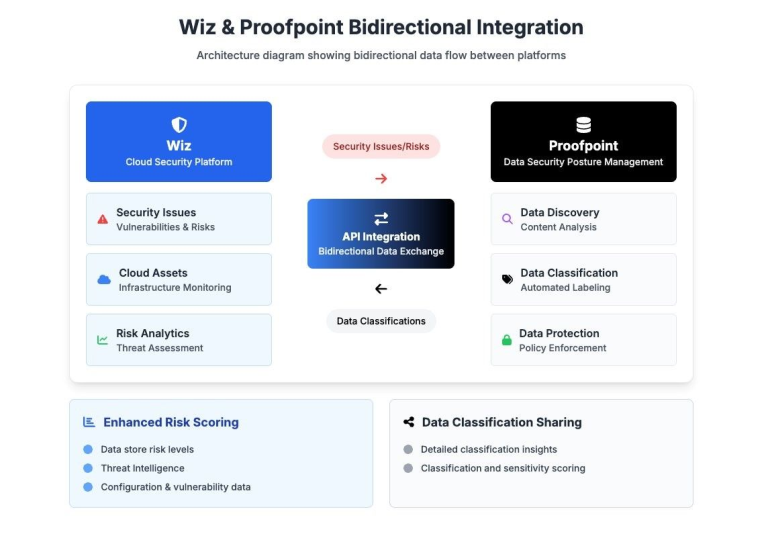
Wiz integration enhances DSPM by bringing in cloud infrastructure risk signals (such as misconfigurations and vulnerabilities) that help security teams better understand the true exposure of sensitive data.
Wiz integration is supported for AWS, Azure, and GCP data stores.
DSPM continuously discovers and classifies sensitive data across cloud and hybrid environments, and evaluates data risk based on sensitivity, access paths, configuration posture, and potential impact. Through this integration, Wiz Issues are ingested every 24 hours and mapped to the cloud resources DSPM monitors.
This enriched context allows DSPM to:
- Correlate sensitive data with known infrastructure risks
- Highlight cloud resources that are both sensitive and insecure
- Deliver a more comprehensive and unified view of risks and issues on customers cloud assets.
With this integration, security teams can focus on the most at risk cloud assets where valuable data is exposed and take informed remediation actions across both platforms.
Setup Instructions
Prerequisites
- Valid Wiz API credentials with access to the Issues API.
- DSPM tenant with Wiz integration enabled.
- DSPM and Wiz must be deployed on any data stores you want monitored on both platforms.
Step 1: Enable Wiz Integration
To securely connect DSPM to Wiz, you must create a new integration entry in the Wiz console. This generates a dedicated service account with the required credentials.
- In Wiz, go to Connect to Wiz ↗ and click Integrations.
- Under the appropriate category (e.g., Data Security, SIEM, or Third-party Tools), or by using the search bar, find and select Proofpoint DSPM (or create a generic integration if not listed).
- On the New Integration page, enter the following information:
- Name: Enter a meaningful name such as DSPM.
- Scope: (Optional) Set the Project scope if you want to restrict this integration to a specific project.
- Review the required permissions for the service account. These are predefined by Wiz and cannot be modified.
- Click Add Integration. Wiz will create a new service account for this integration.
- Under New Service Account Credentials, copy and securely save the following values:
- Client ID
- Client Secret
- API Endpoint URL
- API Authentication URL
Save these credentials in a secure location. You will need them in the next step to connect DSPM to Wiz. For more details, see https://docs.wiz.io/docs/proofpoint-integration.
Step 2: Enable Integration in DSPM
- In DSPM, go to Settings > Integrations.
- Click Add New.
- In the Application list, select Wiz.
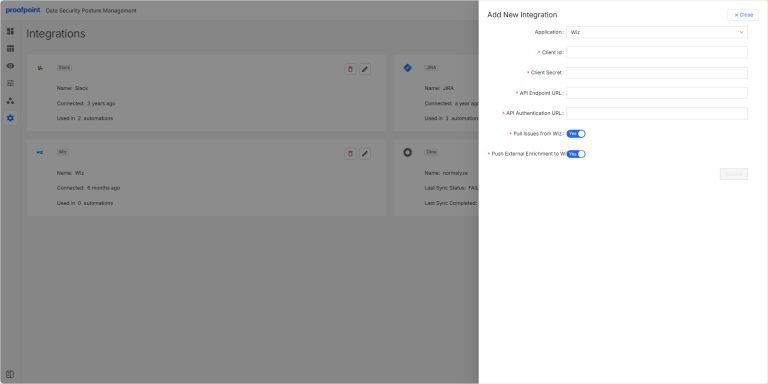
- Enter the following details:
- Client ID
- Client Secret
- API Endpoint URL
- API Authentication URL
- Turn on the Pull Issues from Wiz toggle.
- Turn on the Push External Enrichment to Wiz toggle.
- Click Submit.
You are now ready to go – DSPM will now sync and push issues based on your settings on assets that have both Wiz and DSPM deployed on.
Step 3: Verify Issue Synchronization
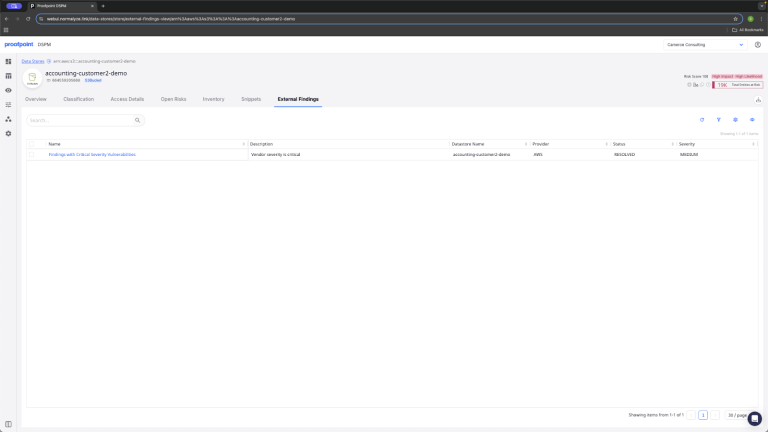
Once the integration is enabled, DSPM will fetch infrastructure issues from Wiz on a daily (24-hour) schedule. These issues will appear in the External Issues tab in DSPM.
The following six columns are displayed:
|
Column |
Description |
|---|---|
|
Status |
Current state of the issue (e.g., OPEN, RESOLVED, EXPIRED). |
|
Severity |
Wiz-assigned severity level (e.g., LOW, MEDIUM, HIGH, CRITICAL). |
|
Resource Name |
Name of the affected cloud resource (e.g., VM, storage, container). |
|
Provider |
Cloud provider where the issue occurred (e.g., AWS, Azure, GCP). |
|
Issue Name |
Name of the Wiz rule or control that triggered the issue (link back to Wiz console). |
|
Description |
Text description from Wiz detailing the issue or control logic. |
How It Works
- Pull Issues: DSPM connects to Wiz once per day and retrieves recent issues using the GraphQL issuesV2 endpoint.
- Correlation Issues: DSPM maps issues to impacted data stores using metadata (e.g., provider ID).
- Link Back: Issues link back to the Wiz console directly, allowing you get more information on the issue within Wiz or to use these issues as an additional prioritization metric.
- Data Store Dashboards: Data stores show Wiz-sourced issues tied directly to sensitive data.
- Push Enrichments: DSPM pushes data findings as enrichment into the Wiz console to update the severity and risks of issues within Wiz (these will show up as external enrichments). For details, see https://docs.wiz.io/docs/proofpoint-integration.