Understanding Data Exposure and Share Levels in Proofpoint Cloud DLP
Risks of Data Exposure
Data exposure occurs when sensitive information is shared in ways that go beyond its intended audience. Risks vary depending on who has access and the type of data involved:
-
Internal exposure: Shared with individuals inside your organization, such as colleagues on the same domain.
-
Company-wide exposure: Shared with all users across the organization’s managed domain(s) with a link to access the data.
-
External exposure: Shared with individuals outside your organization’s trusted domains.
-
Public exposure: Shared with anyone on the internet with a link to access the data, either with or without authentication.
File exposure risks can occur in multiple ways:
-
Direct sharing: Explicitly granting access permission to individuals or groups.
-
Link sharing: Generating a link that may allow anyone with the link to access the file.
-
Indirect sharing: Uploading a file to a Microsoft 365/Google Shared Drive, that can be accessed by an external user or guests who have access to the SharePoint site or Shared Drive.
Example of a file sharing dialog in Microsoft OneDrive:
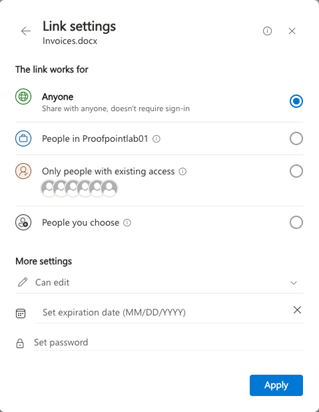
Proofpoint Cloud DLP helps detect and remediate overexposed files by identifying risky share levels, alerting administrators, and applying automated remediation actions such as unsharing files or removing external users or broad sharing links.
Understanding Data Share Levels
One of the most important attributes for sensitive data is its visibility or share level which reflets who who has permission to access or update the data. In Cloud DLP, share levels are categorized as follows:
-
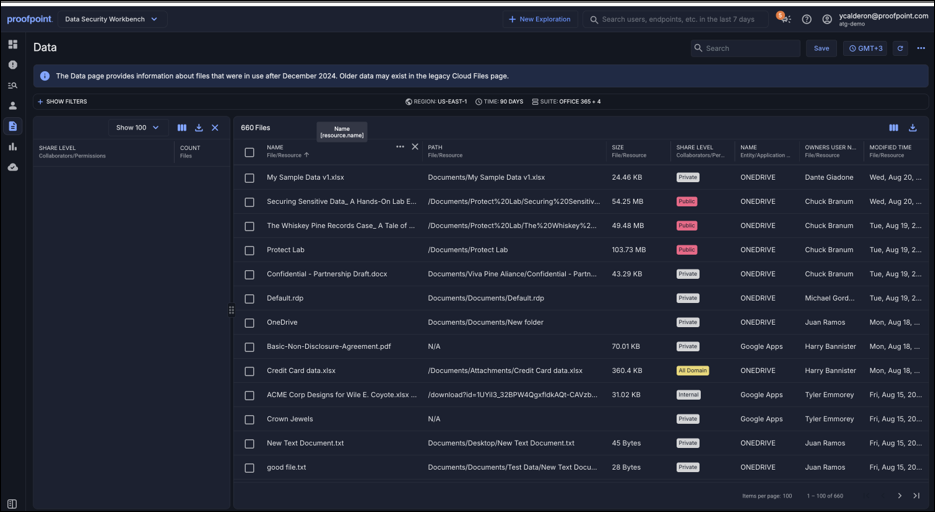
Private: The file is not shared with anyone. Only the file owner has access.
-
Internal: Shared with one or more users within your organization.
-
All Domain: Shared with all users in your orgnization (based on the internal domains list)
-
External: Shared with one or more users outside of your organization. These are users whose email address’ domain is not part of your internal domains list)
-
Externally Owned: The file is owned by an external account and shared with users in your organization.
-
Public: The file can be accessed by anyone (no authentication required).
-
Unknown: Proofpoint Cloud DLP cannot evaluate the share level or determine with whom the file is shared. (This is rare; e.g, Microsoft 365 file owned by an application and cannot be classified as external or internal)
Example:
The screenshot below shows the a cloud file in the Workbench app Data page with multipe sharing permissions, each with a different share level.
Internal Domains and Share Levels
The concept of internal domains is critical to determining whether sharing is internal or external. For more information
-
By default, Cloud DLP automatically syncs your organization’s managed domains from connected cloud services.
-
You can also add trusted domains manually in Administration app > Integrations > Cloud Applications > Configurations > Internal Domains.
All listed domains —whether synced or added—are recognized system-wide as internal.
Examples of usage:
-
A file shared with @proofpoint.com is treated as Internal.
-
A file shared with a partner domain you’ve added to Internal Domains is also treated as Internal.
-
Files shared with groups or uploaded to shared drives/ calculate share levels based on the group or membership (see Cloud DLP and File Sharing).
See Configuration | Internal Domains for setup details.
Using Share Levels in Cloud Rules
Cloud rules allow you to generate alerts when uploading or updating exposed sensitive data or shen sharing sensitive data based on its share level.
Relevant attributes include:
-
Visibility: Evaluates the current share level of a file or data that is being used ( updated, uploaded). This is relevent for content sharing rules.
-
Shared with: Evaluates all assigned file permissions involved in a content sharing activity. It relates to the data exposure levels related to the sharing activity performed by users.
Related Topic: File Visibility vs. File Access Scope
Cloud DLP distinguishes between two change types when monitoring file sharing:
-
File Access Scope Change: A change in who can access a file (e.g., adding external users, adding a write permission).
-
File Visibility Change: A change in how discoverable a file is (e.g., private → domain-wide).
Both event types can independently trigger alerts and rules. For example:
-
Sharing a private file to “Anyone with the link” triggers a visibility change.
-
Adding an external collaborator triggers an access scope change.
When both conditions are met, Cloud DLP logs both activities separately.
With this structure, you can understand the risks of data exposure, how share levels are determined, how internal domains play a role, and how to enforce policies using cloud data rules.