Profiles are definitions that are configured on DSPM for a combination of Entities that are detected in the same file
What are Profiles?
A profile is a combination of a set of entities with a proximity requirement. A single entity has a higher chance of being inconsequential. By looking for more than one entity in close proximity, we increase the likelihood that the data is indeed sensitive.
Example: If Name and Email address appear as columns in a database or in the same file, then this combination is defined as a Profile. Each of the columns will be tagged with the Entity and the corresponding Table will be tagged with the Profiles.
Note that a profile can also include multiple combinations of entities.
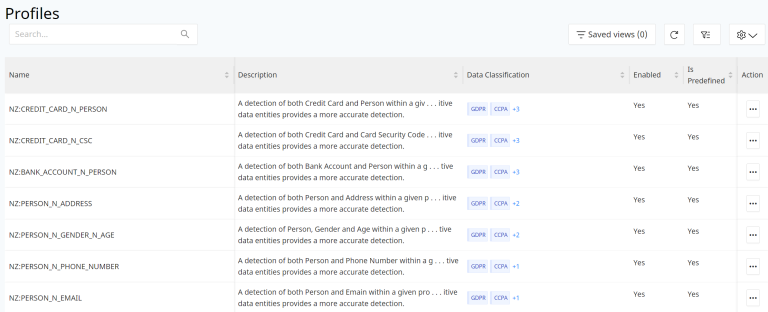
Information about each Profile listed includes:
- Name
- Description
- Data Classification
- Enabled (Yes or No)
- Is Predefined (Yes or No)
Options to Edit or Delete Profiles are not available for Managed Profiles.
Managed Profiles
There are Profiles that are already configured on the DSPM platform based on the existing set of Entities and the possible combinations for them. These values are the ones that are tagged under the Profiles column for each of the data stores that have completed scanning.
Custom Profiles
Custom entities created also need corresponding Profiles created to ensure that sensitive data stores with custom data types are classified accordingly.
Create a Profile
Select the blue Create Profile button to add a new Profile.
On the next screen, select if you want the Profile to be Enabled or not.
Add the Profile Name, Description and any Rules.
Each Rule requires:
- Name - Name of the custom profile as per the naming convention.
- Proximity - This field is used to define the distance of the different entities that are part of the profile. In other words it is an approximate character distance between 2 entities. For eg: if the first pattern of the entity in the profile is a 10 character string then the proximity would be 10 or more for the next entity.
- Description - Brief detail about the custom profile.
- Entities - The list of entities that together if found in a file in the data store would be considered as a single identifier called as a Profile. For eg: if there is file which has Name of the person and the SSN in close proximity, then together they are considered as a Profile.
The entities for custom profile can be a combination of 2 or more custom entities as defined or a combination of default entities and custom ones.
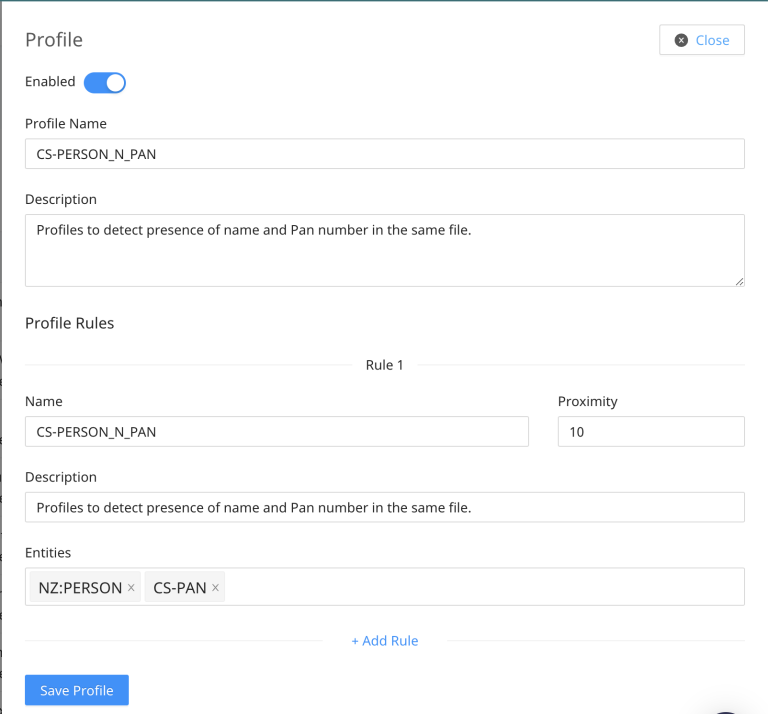
The evaluation of a custom profile is done exactly same as for the default set of Profiles that are available out of the box. Based on the evaluation if the defined entities are detected in the files, then the data store is tagged with the "Profile Name" as defined in the configuration.
Select the blue Save Profile button after the required configurations are completed for the custom Profile to be effective in the system.
Delete a Profile
Select the dots menu and then Delete Profile in the row of the Profile you want to remove.
DSPM managed profiles cannot be deleted.