Managed and custom entities
What Are Entities?
Entities are individual pieces of potentially sensitive data, such as bank account numbers (IBAN), credit card numbers, names, dates, etc.
An entity match may not mean the data is sensitive as there can be lots of instances where an entity by itself does not completely represent sensitive data
Information about each entity will be listed in columns including:
- Name
- Description
- Data Classification
- Enabled (Yes or No)
- Is Predefined (Yes or No)
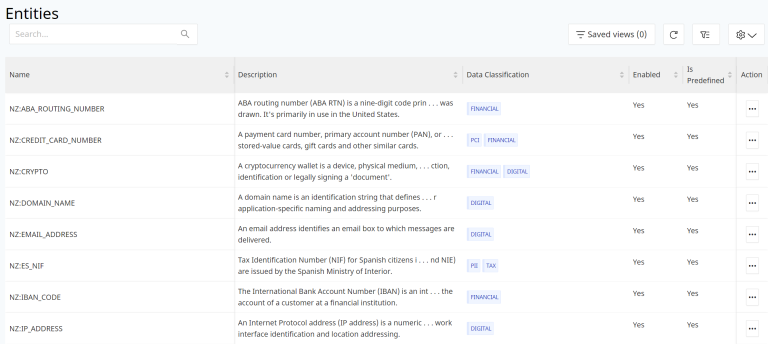
DSPM Entities
An extensive set of pre-defined entities based on industry definitions are enabled in DSPM.
These system defined entities are designated with the prefix ‘Nz’ and cannot be modified, disabled, or deleted.
Custom Entities
Custom entities can be created per your business and functional requirements as well.
Create Entity
Select the CREATE ENTITY blue button to create your own Entity in DSPM.
On the next screen, select if you want the Entity to be Enabled or not.
Add the Entity Name, Description and any Rules.
Each Rule requires:
- Name - Name of the Rule for the Custom Entity
- Description - Short detail about the Rule.
- Pattern - The pattern that would be used for matching the value from the document, files, records etc and then identifying it as a a valid Entity against the data store.
This is a Regular Expression pattern based on the requirement as needed to be validated and matched.
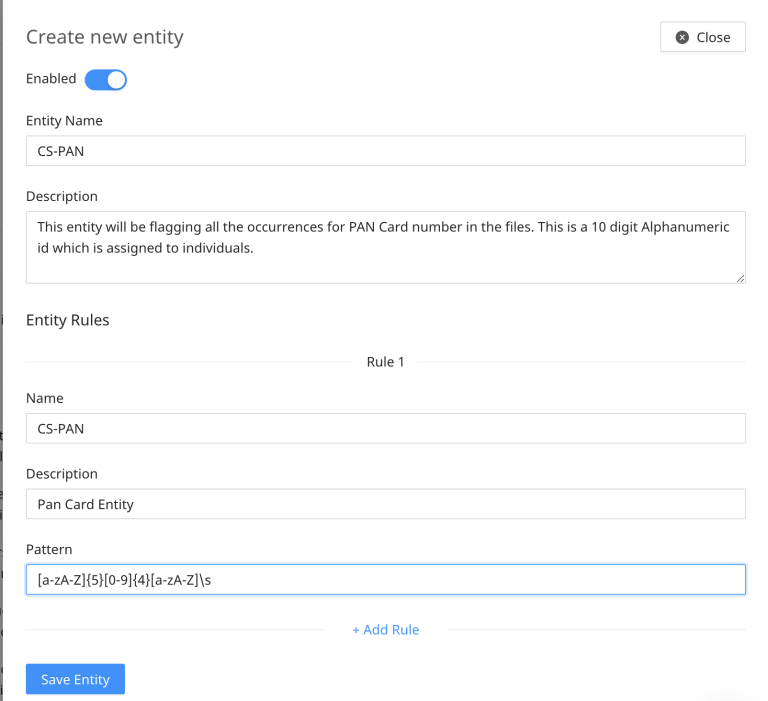
For eg: the following is a Pattern structure that will be used for matching records that have the format of first 5 values as alphabets, next 4 as numeric and the last value as alphabet:
[a-zA-Z]{5}[0-9]{4}[a-zA-Z]\sThe regular expression being added for the Pattern should be compatible with Perl Compatible Regular Expression (PCRE) since this is the framework used for pattern matching in the files under the data stores.
Based on the pattern matching for the custom entity, the "Entity Name" is tagged against the data stores like the other set of default entities and the snippets for these too are generated accordingly.

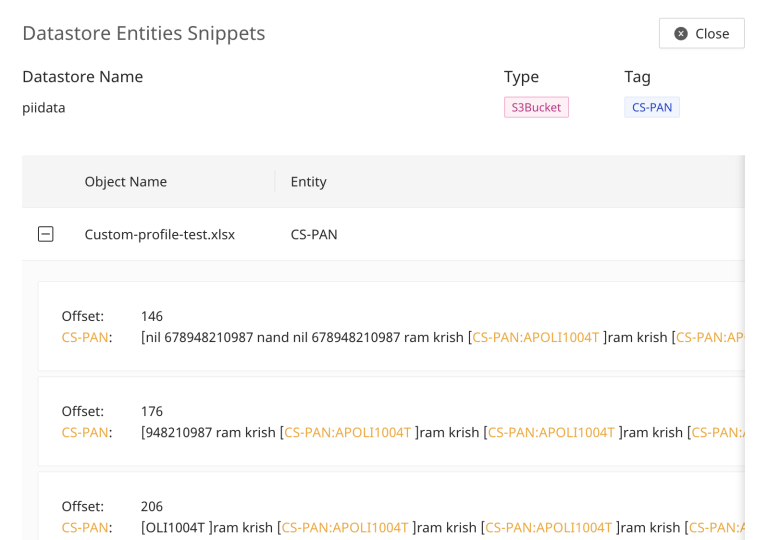
To evaluate and match multiple different combinations, add additional Rules as required by selecting the +Add Rule link.
Select the blue Save Entity button after the rules are added and the configurations are completed for the Custom Entity.
Delete Entity
Select the dots menu then Delete Entity in the row of the Entity you want to remove.
DSPM managed entities cannot be deleted.