To view the new Data Store pages, click your profile icon. In the New UI section, turn on the Data Stores toggle.
The More Details panel provides you with an in-depth view of a data store, offering comprehensive information across various categories. This panel is accessible from any data store view (e.g., Microsoft Teams, SharePoint, S3 Buckets, Oracle Databases) and consolidates critical details for analysis and management.
By leveraging the comprehensive information available in the Details Panel, you can gain a deeper understanding of your data stores, identify potential risks, and ensure compliance with data governance policies.
To view the More Details panel:
- Select Inventory > Data Stores.
- Select the Data Stores tab.
- Select a data store. The data store details are shown.
- Click More Details beside the data store name. The More Details panel opens.
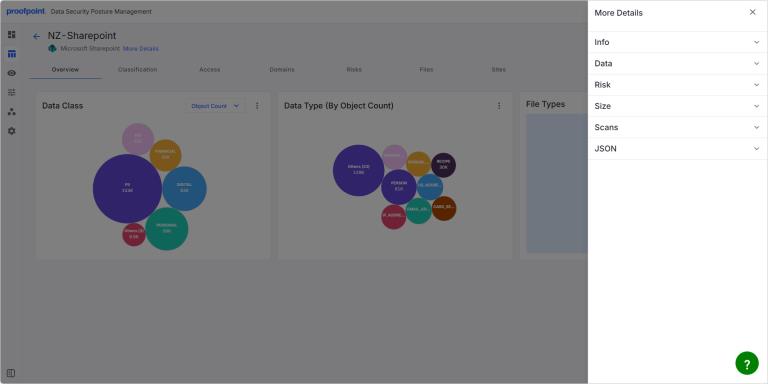
The More Details panel contains the following expandable sections.
The information in each section may be slightly different depending on the type of data source.
Info
The Info section provides fundamental identification and configuration details about the data store.
- Type Type of data store (e.g., microsoft_teams, microsoft_sharepoint, s3Bucket, ONPREM-ORACLEDB).
- Provider Service provider for the data store (e.g., microsoft_365, us-east-1).
- Region Geographical region where the data store is hosted.
- Account Name Name of the account associated with the data store.
- Account ID Unique identifier for the account.
- Resource ID Unique identifier for the specific data store resource.
- Custom Tags You can add tags to help you identify the data store. These tags can be used as filters on Data Stores pages and related pages.
-
Ownership Ownership information for the data store.
- Tagged owner Indicates if an owner has been tagged for the data store.
- Owner Displays the name or identifier of the data store’s owner. You can assign or change the owner if needed. Only qualified team members will appear in the list.
Data
The Data section provides a detailed breakdown of the data types and classifications found within the data store.
- Classification Lists the various data classifications that have been identified.
- Data Type Lists the specific types of sensitive data that have been discovered.
Click Show more or Show less to expand or collapse theses lists.
Attributes
The Attributes section provides additional technical attributes of the data store.
- Structured Indicates if the data is structured.
- Encryption Encryption status.
- Public Indicates if the data store is publicly accessible.
- Backed up Indicates if the data store is backed up.
Risk
The Risk section provides summary information for the risks related to the data store.
- Risk Score Aggregated risk score. This is the max score (likelihood and impact) across all risks found for the data store.
- Total Impact Total impact score for the data store. This score captures the severity of the security breach for the identified risk.
- Total Likelihood Total likelihood score for the data store. This score captures the possibility that this risk can lead to a security breach.
Size
The Size section provides metrics related to the volume of data stored.
- Volume Total size of the data store.
- Total Object Count Total number of objects or files within the data store.
Scans
The Scans section provides information about the scanning activity on the data store.
- Last Scanned Date and time of the last scan.
- Scan Status Outcome of the last scan (e.g., Succeeded).
- Scans Scheduled Details about any scheduled scans.
JSON
The JSON section allows advanced users to view the raw JSON representation of the data store’s metadata.
- Click View to display the full JSON data.
- After clicking View, click Export to download a JSON file.
Engine
The Engine section provides details about the scanning engine used for the data store.
- Engine Name Name of the scanning engine.
- Engine Version Version of the scanning engine.
Activity
The Activity section provides a log of recent activities related to the data store.