Which risks need to be resolved first?
To view the new Dashboard, click your profile icon. In the New UI section, turn on the Dashboards toggle.
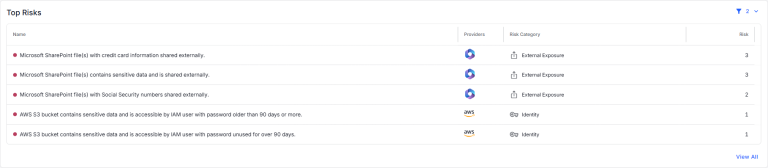
View the most critical risks discovered for your accounts. High risks (based on the risk’s impact and likelihood scores) should be resolved first.
Impact refers to the severity of the security breach for the risk (Low, Medium, High).
Likelihood refers to the possibility that the risk could lead to a security breach (Low, Medium, High).
The account provider and the risk category are shown for each risk. You can:
- Use the filters in the top-right corner to select the risk categories and severities to show in the list. The currently applied filters are shown below the list.
- Click a risk name to view the risk details (on the Enabled Policies page).
- Click a risk category to view all risks in that category (on the Open Risks page).
- Click the number of risks for a risk category to view the resources at risk (on the Open Risks page).
- Click View All to view all open risks (on the Open Risks page).