Who can access sensitive data in your cloud?
To view the new Dashboard, click your profile icon. In the New UI section, turn on the Dashboards toggle.
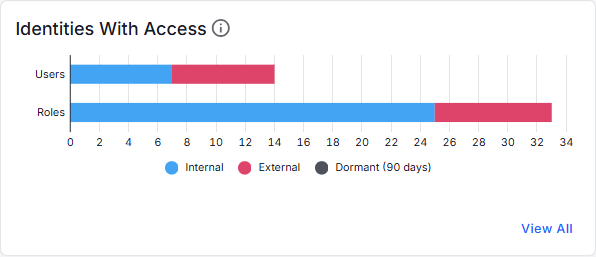
View the users and roles that can access your sensitive data.
The Users bar graph shows users with access to sensitive data.
- The graph shows a breakdown of the number of internal users, external users, and dormant users.
- Hover over a section in the graph to view the number of users.
- Click a section in the graph to view details about the users (on the Identities page).
The Roles bar graph shows roles with access to sensitive data.
- The graph shows a breakdown of the number of internal roles, external roles, and dormant roles.
- Hover over a section in the graph to view the number of roles.
- Click a section in the graph to view details about the roles (on the Identities page).
Click View All to view details for all users with access to data (on the Identities page).