How is your data being transferred?
To view the new Dashboard, click your profile icon. In the New UI section, turn on the Dashboards toggle.
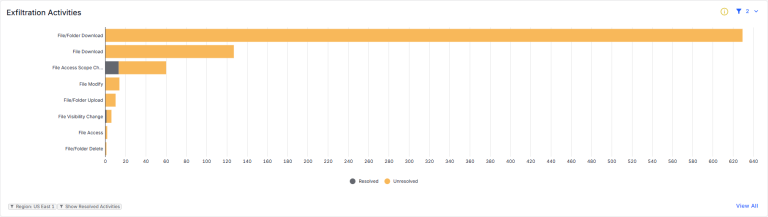
View exfiltration activities for your data stores. This includes activities used to transfer data, such as downloading files, printing files, and copying files to a USB device.
- Use the filters in the top-right corner to select the region you want to view. You can also choose to include or exclude resolved activities in the bar graphs. The currently applied filters are shown below the graph.
- Click a section of a bar graph to view details for the activity. You can also view applicable rules and create a new rule.
- Click View All to view a detailed breakdown of activities (in Data Security Workbench).