What data stores do your cloud accounts contain?
To view the new Dashboard, click your profile icon. In the New UI section, turn on the Dashboards toggle.
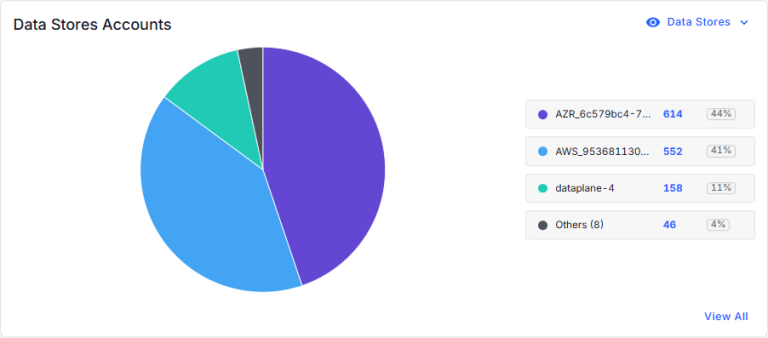
View the data stores in your accounts. You can view this information by:
- Data Stores
- The list shows the number of data stores in each account and the percentage of your data stores that belong to this account.
- The circle is divided into your accounts. Hover over a section of the circle to view the data store count for an account.
- Click one of the accounts (or a section of the circle) to view the data stores for the account (on the Data Stores page).
- Click View All to view data stores for all of your accounts (on the Data Stores tab).
- Monetary Value
- The list shows the monetary value of the data stores in each account. This represents the financial impact if the data was lost, stolen, or compromised.
- The circle is divided into your accounts. Hover over a section of the circle to view the monetary value for an account.
- Click one of the accounts (or a section of the circle) to view the data stores for the account (on the Data Stores page).
- Click View All to view data stores for all of your accounts (on the Data Stores tab).