Selective User Monitoring allows you to apply different protection levels for the different user groups utilized by your connected apps. It is used by organizations who want to provide different levels of protection to different types or categories of users.
Examples of why CASB customers use Selective User Monitoring
-
Geofencing – Apply or exclude CASB protections to specific user groups based on their region.
-
Faculty/Staff vs. Student Protection – Customers can provide different levels of protection to diverse user groups, for example: a university might provide a higher level of CASB protection to their staff and a different level of protection for their students.
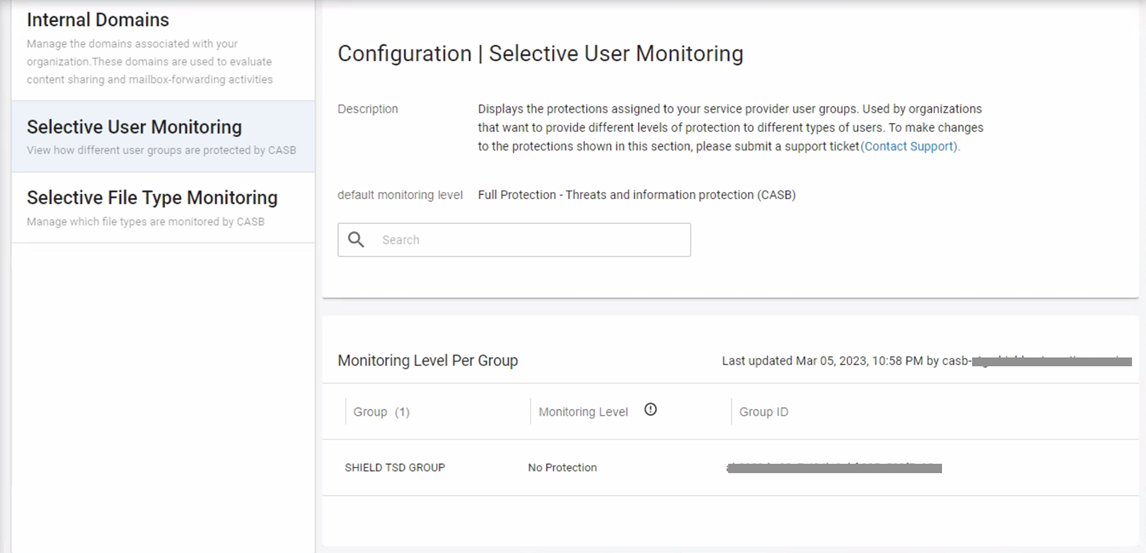
When Selective User Monitoring is enabled and data populates in this section, you will see the following fields:
-
Group – Name of the user group
-
Monitoring Level – Assigned service protection (CASB, CAD, or No Protection)
-
Group ID – user group identifier assigned by the connected app provider
Use the search bar in this section to filter the monitored group names.
Other than the search feature, this section is read-only.
If this section does not display any user group data, it means your service is not currently using Selective User Monitoring. To enable Selective User Monitoring, contact support.
Changes made to a service provider’s user groups will populate in this section within 24 hours. If you need changes to the protections assigned to the user groups listed in this section, submit a support ticket.